Friday, 31 August 2018

Go Beyond Design with Navisworks

Navisworks has become one of the most important tools or software for Building Information Modeling (BIM).  It allows all the project stakeholders to collaborate on a single platform through various tools and features. One of the most important features of Navisworks is its ability to integrate various file formats from other software, these models or designs can be created by various designers and modelers through their software. Model integration can encompass huge amounts of information that needs to be analyzed for clashes and simulated for walkthroughs and quantification.
Navisworks goes beyond mere design for all the project stakeholders to view the actual model in real-time through various animations, walkthroughs, and lighting effects. Let’s move further, and have a look at some of the most notable benefits of Navisworks and 4D Navisworks as well. Well, 4D Navisworks isn’t a different software, but a part of Navisworks that takes in Quantification, Animation, Lighting Effects, and the application of the TimeLiner to schedule projects in real-time.
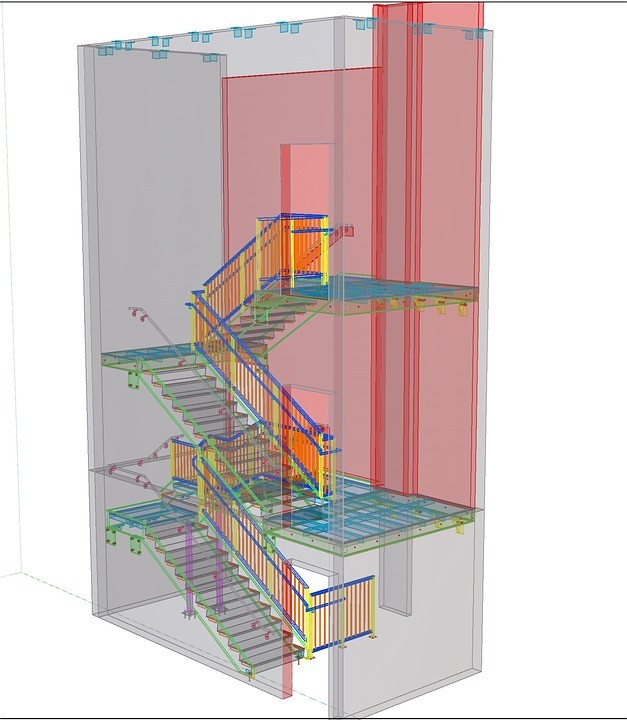
Source Pixabay
Source: Pixabay
Let’s turn to Navisworks for its benefits –

Model Review and Design

The primary feature of Navisworks is a comprehensive suite of features that are used to review and analyze 3D models from various designers and their software. AEC professionals need to check for clash detection in the design and furthermore check the model for functionality based on pre-determined requisites. Users can now open. NWC and NWD files through file import, the workflow allows users to collaborate on a single platform for their designs to create clash free models.

2D Support

Most of the users don’t know this, but Navisworks can also pull in 2D drawings for onsite use.  This provides higher details to information about the functionality of the model. Navisworks provides users with a way to use and save 2D drawings in the. NWD format, this means users get a comprehensive view of the files using all the features and tools like markup, viewpoints, TimeLiner, sections, and more. Objects and items can be found across both – 2D and 3D (sheets and models). It also includes one of the most crucial features of 4D Navisworks, i.e. Quantification.

Create great visuals

Navisworks is predominantly used to create exceptional renders and walkthroughs for owners and stakeholders to visualize photorealistic views based on 3D models and project information.  The entire 3D model can be viewed and provided walkthroughs that need to be analyzed with agility and precision.  Materials and lights can be added to various objects for realistic possibilities. Add colors to anything and everything using tools like the Appearance Builder for project updates and identification.

Work in the Cloud 

The Cloud has created extreme flexibility, scalability, and security for users to store and retrieve that data on the fly. Rendering and working on the cloud is easy for various users. This improves collaboration during the complete life-cycle of the construction project. Access files directly from the cloud through BIM360, and merge models in the cloud for all the stakeholders to view and perform clash detection in a user-friendly environment.

Precise Clash Detections

Coordination and Clash Detection has gained significant traction for modelers and various stakeholders to identify interferences across various objects and elements.  The definition of a clash is quite simple, it means elements that occupy the same space. Navisworks uses the clash detective tool to identify interferences for 3D geometries, Point Cloud Scans. Custom clash tests can be customized for export, batch tests, object intelligence, and more using Clash Detective, Object Animation, TimeLiner. A combination of these three tools can be used to check interferences, time-based clash checks, and create animated TimeLiner Schedules. These model can be viewed through 3D glasses as well if the system supports a 3D view.

On a closing note,  


Navisworks is a cutting-edge tool for Engineers, Modelers, Owners, and various stakeholders to review information-rich models, and create photo-realistic walkthroughs. It also reduces change orders to a minimum through accurate analysis and Clash Detection. When it comes to providing effective solutions for quantification, clashes, viewpoints, animation, rendering and walkthroughs, Navisworks has proved to reduce rework and enhance productivity by miles.
Source: https://nibt.education/blog/2018/08/go-beyond-design-with-navisworks/

Going Beyond Design with Navisworks!


#Navisworks is a very important tool for the #Construction #Industry and is used for Global #BIM procedure!

To Know more about Naviswork Check out the Full Video!
Get more about Naviswork Course Visit -
http://bit.ly/2LH9YCc

Thursday, 30 August 2018

Introduction to EVM- Earn Value Management


Learn And Explore The Essentials Of #Earned #Value #Management In The Construction Industry, Also Get Familiar With The Principles Of The Use Of Process In Construction Projects.
To Know More Check The Video Here @ http://bit.ly/2LDN4M8

Thursday, 23 August 2018

The Most Easiest Path To Become An MEP Engineer- Know How!

Are you planning on becoming an engineer, especially an MEP engineer? Or may be Engineer-In-Training (EIT) or Architect in the MEP industry and want a good understanding of what the industry has to deliver you.
Here is a summary of AEC industry insights that all current and future MEP engineers should consider. That would be easier and help you to become a good MEP Engineer.
What is an MEP Engineer? The next bullets define the three leading groups of MEP engineering specialists and few of the professional consulting services they produce.


MEP-


M- Mechanical Engineers design the Heating, Ventilation, and Air Conditioning, i.e., HVAC systems in buildings also other constructions where people meet.  The below of design and assessment consulting services are given.
  • Air distribution & Central utility plants
  • Utility control planning and design
  • Infection control HVAC
  • Process piping, etc.
E- Electrical Engineers design the electrical systems in buildings and also, other structures where people are gathering. Here the following are the types of design and assessment consulting services they provide.
  • Power distribution
  • Standby power systems
  • Electrical and communication systems master planning and design
  • Lighting & Fault current analyses
  • An uninterruptible power supply system and more.
P- Plumbing Designers or Engineers plan the plumbing systems in the building constructions or other structures. The following examples of study and assessment consulting services provided are.
  • Domestic warm & cold water
  • Natural gas piping
  • Medical gas systems, distribution, and alarms
  • Storm drainage systems
  • Acid waste piping and more.
In reality, MEP Engineers construct buildings inhabitable and healthy for people. So when the next time you find yourself in any building, take notice of the MEP engineering design. It is the outcome of a well-planned, analytical process overcoming many constraints to create structures inhabitable for everyone.

Let’s check for education:

Generally, entrance into the MEP engineering world is through education in electrical or mechanical engineering. A bachelor’s degree will open up the opportunity towards becoming an MEP Engineer-in-Training, which then heads to the potential of becoming a Licensed Engineer. An associate’s level education, typically in CAD or REVIT, leads towards becoming an MEP designer.
Furthermore, after completing MEP Engineering, You can also go for Various MEP Courses like Advanced BIM in MEP course, Revit MEP courses, and more from Various construction management institutes. Thus, it will intensify your career and upgrade expertise in your profession.
NIBT- National Institute of Building Technology is one of the Renowned Institute that provides multiple Construction Management and technological courses.
NIBT has come up with the fantastic idea of Imparting education on Advanced BIM technology and is trying to stand out of the crowd by providing quality courses in the construction management field. The Advanced BIM in MEP-FP Course is excellent for all the Civil, Mechanical, Electrical engineers. Enroll at the earliest to get a satisfying career ahead!

The MEP engineering career ladder can lead to several different paths. Just as every engineer has different goals, aims, and motivations, there is an MEP career path that can suit each.
Source: https://nibt.education/blog/2018/08/most-easiest-path-to-become-an-mep-engineer-know-how/

Wednesday, 22 August 2018

Discover e-Learning Standards & it’s Advantages

e-Learning is expanding its wings rapidly in the current education system. e-Learning is an affordable solution that provides students with the ability to learn in their Comfort Zone and make their schedules efficiently.
It is the delivery of a learning, training or education program ONLINE, or on an e-Learning Platform is e-Learning.

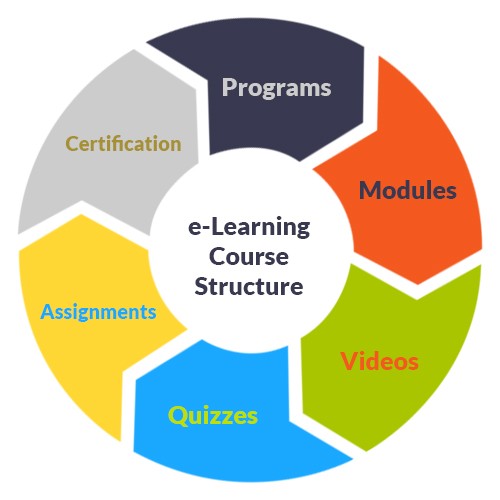
The process or structure of e-Learning in the diagram below.


structure of elearning

Check e-Learning Standards-

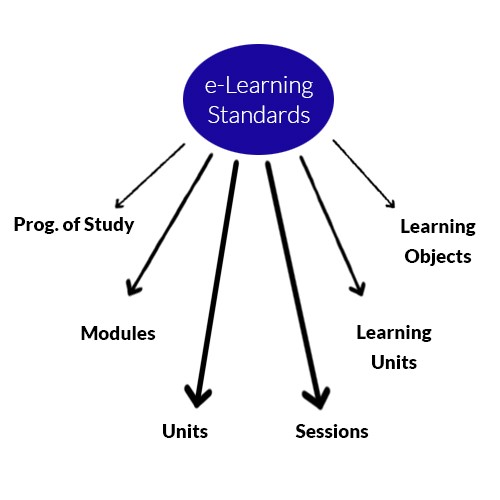
The resolution of e-Learning depends upon the successful movement of existing pedagogically sounds of courses elements into the e-Learning structure. Thus, the standards are interpreted in the diagram below:
elearning Standards
elearning Standards

In the conventional face-to-face teaching process, the module gets divided into 20 hours of lectures, additional activities, and evaluation. In e-learning environment the concept of a “lecture,” is unavailable and it is to be moved to place lecture notes online, or to compose an e-lecture, we surely shouldn’t be looking at 1 hour of delivery of such materials.
It is essential to understand the course materials and re-engineer them within proper sessions which get created from Learning Units. A Learning Unit is an exercise, i.e., reading, listening, assessing, writing, etc. where each Learning Unit is no longer than 20 minutes of online activity.
A Learning Unit contains:
  • learning content,
  • evaluation,
  • resource study
  • or communication.

Let’s check out the Advantages of e-Learning-       

Advantages of e-Learning include that it can be:

  • The best A4 of e-Learning – Anytime, Any Place, Any Pace, Any Subject: e-Learning elements can be accessed at the most comfortable time for the learning if the course matter is well created then learning can take place in small sections and can be customized to suit the learner’s requirements.
  • Empowerment: Students are in charge of their learning.
  • Versatility: e-Learning element can be accessed in a non-sequential way, empowering students to navigate content in various ways, or gain a global view before taking the details of individual members.
  • Cost Efficient: vast numbers of learners can have access to the same stuff but can be held by peer-to-peer or student-to-tutor support assistance thus it reduces the cost of delivery.
  • Up-to-date Content: Course content is found in one place so it can be quickly updated and can present direct links to supporting materials such as Internet and library sources.
  • Tailored Education: the time required to learn a singular topic or skill is decreased or “compressed” as learning can be changed to suit the user’s demands and requirements. E-learning can give a variety of learning activities including interactive components.
  • Socio-inclusive: learners can learn in a comparatively unknown environment without the embarrassment of failure and socio-cultural bias from personal communication.
  • Consistent: all learners get the same standardized set of study materials from e-learning.
  • Interactive: well-constructed study materials will have elements of interactivity through simulations etc. which will implement the learning.
  • Collaborative: The performance of groups and teams working together in collaborative learning and learner-learner communication enforces employability skills.
  • Applied To Track Student Performance: student practice of the materials is monitored, and initial potential drop-out can be identified and given corrective support.
  • Used to Facilitate knowledge: The understanding of ideas by suggesting alternative methods of visualizing documents and alternative solutions to those provided in a single delivery mode such as a lecture, seminar or tutorial.

For example- Multimedia and hypermedia.
  • Get Instant feedback: Get Quick reply from online self-assessment or moldable assessment mainly through MCQs, i.e., multiple choice question formats.
  • Self Assessment: learners can be extended automatically-marked self-assessment activities to identify skill/knowledge levels and learning requirements before joining with course content.
  • To assist students with specific Disabilities: Introduction for students with hearing and some physical disabilities may heighten.

Sunday, 19 August 2018

Revit Structure Overview


#Designers & #Engineers Learn #Revit #Structure #Modeling and Gain Expertise in Creating High Quality Renders, Animation & Walk throughs.

Also Do Visit @
http://bit.ly/2wfZWm1

Saturday, 18 August 2018

Revit Introduction


Free #Revit Preview course helps to Learn the basic of Revit #Introduction, Revit #MEP interface, File Concepts, and more, only @ NIBT e-Learning Portal!

To Know more check this video & Also Visit 👉
http://bit.ly/2KFyEdR